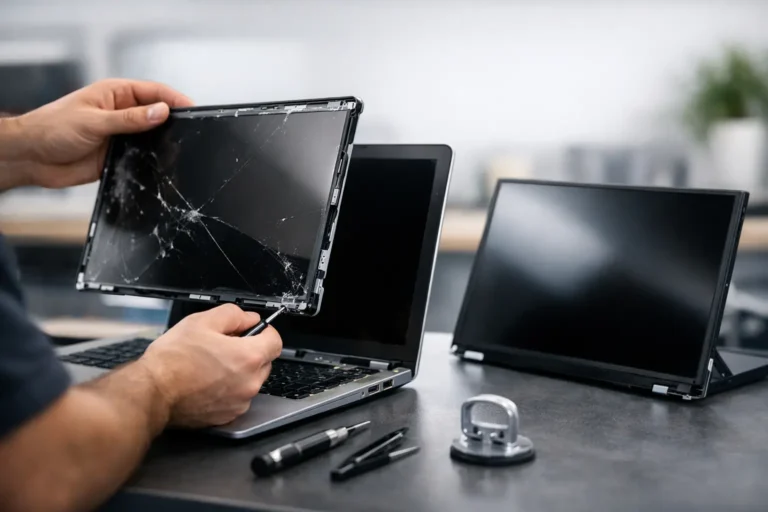
A cracked display changes the math on a laptop fast. One drop, one pressure point in a backpack, or one closing hinge issue can leave you asking the same question most people do right away: what is the laptop screen replacement cost, and is it worth fixing?
The honest answer is that it depends on the laptop, the type of screen, and whether the damage stops at the panel or reaches other parts around it. For most people, the goal is not just finding the cheapest number. It is getting a reliable repair, avoiding repeat problems, and knowing whether the repair makes more sense than replacing the whole device.
What affects laptop screen replacement cost
Screen replacement pricing is shaped by a few major factors, and they matter more than many people expect. The first is the screen itself. A basic non-touch HD panel on an older or entry-level laptop usually costs far less than a high-resolution touchscreen on a premium ultrabook, gaming system, or business model.
Size matters too. A 13-inch or 14-inch panel may be easier to source than a less common display size, but that is not always the deciding factor. Resolution, brightness, refresh rate, mounting style, connector type, and whether the screen includes digitizer components all affect the final price.
Brand and model can also move the number up or down. Some laptops use common panels that are widely available. Others use model-specific assemblies that cost more and take longer to order. Apple devices, premium convertibles, ultra-thin laptops, and gaming systems often land on the higher end because parts are more specialized and labor can be more involved.
Then there is labor. Replacing a screen on one model may be straightforward. On another, the technician may need to carefully remove adhesive, disassemble the lid, protect the webcam and antenna wiring, or work around a fragile bezel and hinge design. A repair that takes more time and precision usually costs more, even if the panel itself is not unusually expensive.
Typical laptop screen replacement cost ranges
For many standard Windows laptops, the laptop screen replacement cost often falls somewhere between about $150 and $350. That range usually covers common non-touch displays and typical labor.
If the laptop has a touchscreen, a higher-resolution panel, or a premium design, the cost often rises into the $300 to $600 range. Some high-end laptops and MacBooks can exceed that, especially when the repair involves a full display assembly instead of just the LCD or LED panel.
Those numbers are broad on purpose. A basic office laptop used for email and web browsing is very different from a slim aluminum business laptop or a gaming machine with a fast refresh display. Two 15-inch laptops can look similar from the outside and still have very different repair costs.
This is also why low online price claims can be misleading. A quote that sounds unusually cheap may cover only the raw part, may assume a lower-grade replacement, or may not include labor, testing, or warranty support.
Why some screen repairs cost more than expected
People are often surprised when the price is higher than they thought because they picture the display as a simple piece of glass. On modern laptops, it is rarely that simple.
In some cases, the visible crack is only part of the problem. The impact may have damaged the bezel, loosened the hinges, bent the lid, or affected the display cable. If a hinge is too stiff or partially broken, installing a new screen without correcting the hinge issue can lead to another cracked panel later.
Touchscreen systems add another layer. On some models, the glass, digitizer, and display are fused together. That means the repair may require replacing the entire assembly rather than one damaged layer. The part cost goes up quickly when that happens.
Availability is another factor. If a screen is uncommon or backordered, sourcing the correct part can take more time and may cost more than expected. That is especially true for newer models, business-class systems with privacy displays, and specialty gaming laptops.
When a screen repair is worth it
A screen repair usually makes sense when the laptop still runs well, holds a charge reasonably well, and meets your needs for work, school, or home use. If the device is otherwise healthy, replacing the screen is often far less expensive than buying a comparable new laptop and setting everything up again.
It can be especially worthwhile when the laptop contains important software, saved settings, or business data you do not want to migrate in a rush. For remote workers and small businesses, preserving continuity matters. Downtime has a cost too.
If the machine is only a few years old, has solid performance, and the repair cost is a manageable fraction of replacement cost, fixing it is usually the practical move. That is even more true when the laptop is part of a work setup and the user needs to get back online quickly.
When replacement may make more sense
There are times when replacing the laptop is the better call. If the system already has multiple issues like a failing battery, hinge damage, overheating, keyboard problems, or a slow hard drive, a screen repair alone may not solve the bigger problem.
Age matters here. If the laptop is near the end of its useful life and the repair cost approaches a large percentage of the cost of a better replacement, it is smart to pause and compare options. The right decision is not always the repair. It depends on the overall condition, expected lifespan after service, and how critical the device is to your daily routine.
For business users, this is often less about the sticker price and more about reliability. A lower-cost repair is not always the best value if the system is likely to keep failing. For home users, sentiment and convenience can also factor in. Some people would rather repair a familiar machine than start over.
The cheapest option is not always the lowest cost
A screen replacement can look simple on video, but do-it-yourself repairs come with real risk. Screens are fragile, connectors are delicate, and many modern laptops are not designed for easy access. Ordering the wrong panel is common, and damage during installation can turn one repair into several.
There is also the quality issue. Not all replacement panels perform the same way. Brightness, color accuracy, viewing angles, touch response, and overall durability can vary. A bargain part may work, but not work well.
Professional service adds value beyond installation. A good technician confirms the exact part match, checks for hidden damage, tests the display after installation, and makes sure the repair does not ignore related issues like hinge stress or cable wear. That is where transparent pricing matters. You want to know what is included and what happens if the repair uncovers more damage.
How to get an accurate screen repair quote
The fastest way to get a real estimate is to provide the laptop brand and full model number, along with a description of the damage. If possible, include whether the screen still lights up, whether there are lines or black spots, and whether the outer glass is cracked on a touchscreen model.
Photos help. So does mentioning if the laptop was dropped, if the hinges are stiff, or if the lid looks bent. Those details can change the repair plan.
A trustworthy shop should explain whether the quote is based on the exact model, whether labor is included, and whether there is any warranty on parts and workmanship. For local customers in Phoenix and the East Valley, working with an established team like Freelance Computers can make that process much easier because you get a real assessment from real people, not a vague price pulled from a generic parts list.
Laptop screen replacement cost and peace of mind
The real question is not just what the laptop screen replacement cost will be on paper. It is what you get for that cost: the right part, careful installation, honest guidance, and a repair that gives you confidence to keep using the machine.
If your screen is cracked, flickering, bleeding, or completely dark, the best next step is a proper diagnosis before you spend money in the wrong place. A clear quote from an experienced technician can save you time, frustration, and the cost of fixing the same problem twice. Sometimes the right answer is repair. Sometimes it is replacement. Either way, you deserve to know where you stand before the bill surprises you.
