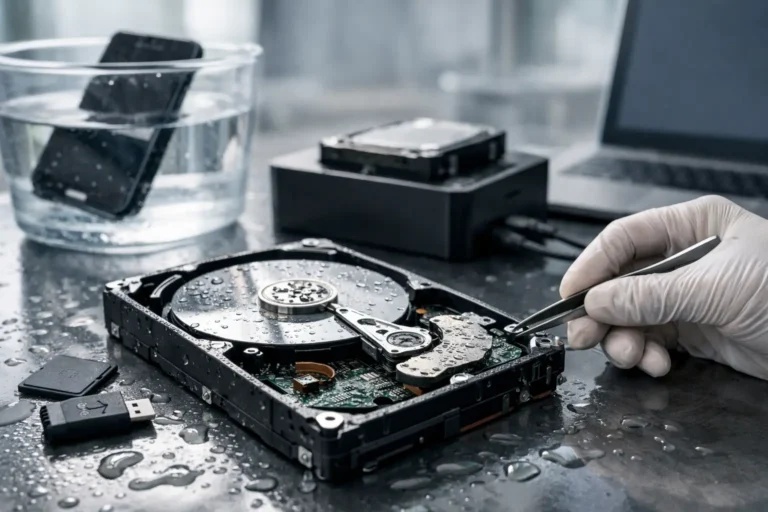
Coffee across a laptop keyboard. A phone dropped in a sink. A desktop caught in a roof leak during monsoon season. When that happens, data recovery after water damage becomes a race against time, not just a repair job. The biggest mistake people make is trying to power the device back on “just to check” if it still works.
Water damage is unpredictable because the liquid itself is only part of the problem. Once moisture gets inside a device, it can bridge circuits, start corrosion, and damage storage components that may still hold your files. Sometimes the computer looks dead but the drive is recoverable. Other times the machine powers on, but every extra minute of use makes recovery harder.
What to do first after a device gets wet
The first step is simple – turn it off immediately if it is still on. If it is plugged in, disconnect power. If the battery is removable, remove it. Do not keep testing buttons, do not connect a charger, and do not restart it to see whether it survived.
After that, move the device to a dry area and keep it off. If you are dealing with a laptop or desktop, disconnect external drives, USB devices, and peripherals. If it is a phone or tablet, remove the case, SIM card, and memory card if possible. These small steps can prevent added electrical damage and may help preserve separate storage media.
A lot of people reach for a bag of rice. That advice has lasted for years, but it is not a reliable fix. Rice does not remove residue, does not stop corrosion, and does not dry the inside of a device evenly. The same goes for using a hair dryer. Heat can push moisture deeper into components or damage delicate parts.
If the liquid was anything other than clean water, the risk goes up. Coffee, soda, sports drinks, pool water, and flood water leave behind minerals, sugar, or contaminants that continue damaging the device even after it looks dry. In those cases, speed matters even more.
Why data recovery after water damage is different
Water-damaged devices are not all recovered the same way because storage type matters. A traditional hard drive, a solid-state drive, a phone storage chip, and a server drive array all fail differently after exposure to moisture.
With a hard disk drive, the goal is often to stabilize the drive electronics and safely access the platters without creating further damage. With a solid-state drive, the challenge is different. SSDs have no spinning parts, but they rely on delicate controller components and memory chips. If the board is corroded or shorted, the data may still exist, but extracting it can require specialized equipment and board-level work.
Phones and tablets add another layer of difficulty because storage is often integrated into the main board. That means recovery is less about replacing a part and more about preserving enough of the device’s logic and power pathways to access the data. Business equipment can be even more complex. If a wet server or NAS system contains shared company files, QuickBooks data, customer records, or line-of-business applications, the value of the data usually far outweighs the hardware itself.
Common mistakes that lower recovery chances
The first mistake is powering the device on. The second is waiting too long. Corrosion starts quickly, and in Arizona, people sometimes assume that dry air will solve the issue on its own. Dry air may help surface moisture, but it does not clean contamination or reverse internal corrosion.
Another common mistake is partial DIY disassembly. Opening a device without the right tools or process can tear flex cables, damage connectors, or contaminate storage parts. For desktops, removing the drive may be reasonable if you know what you are doing. For ultrabooks, phones, Macs, and compact business systems, it is much easier to turn a recoverable case into a more expensive one.
There is also the temptation to use software recovery tools too early. Those tools can be helpful in the right situation, but only after the hardware is stable. If the device has liquid damage and intermittent power issues, repeated scan attempts can stress failing storage and reduce the odds of a full recovery.
When professional help makes sense
If the data matters, professional help is usually the safer path. That is especially true for family photos, legal documents, tax records, business files, and anything that is hard or impossible to recreate.
A professional evaluation typically focuses on two questions. First, can the hardware be stabilized enough to read the storage? Second, if direct access is not possible, can the data be recovered through more advanced methods? That process may involve cleaning corrosion, replacing damaged components, imaging the drive, or using specialized recovery hardware designed to read unstable media without pushing it to failure.
This is one reason local service matters. When you can get a damaged device into experienced hands quickly, you reduce the time corrosion has to spread. For homeowners and small businesses in Phoenix and the East Valley, that speed can make a real difference, especially after storm leaks, plumbing failures, or office accidents.
What recovery can and cannot promise
Honest data recovery work should never promise 100 percent success before testing the device. Some water-damaged drives come back almost completely. Others yield only partial results. A few are too badly damaged to recover at all.
The outcome depends on the type of liquid, how long the device was exposed, whether it was powered during the incident, and what happened afterward. A laptop splashed with water and shut down immediately may have a strong chance. A phone that sat powered on in salt water or a desktop flooded overnight is a different story.
That does not mean a severe case is hopeless. It means expectations should be realistic. Good technicians will explain what they are seeing, what the likely path looks like, and what trade-offs may be involved between cost, time, and probable results.
Data recovery after water damage for business systems
For business owners, water damage is rarely just about one machine. It can interrupt payroll, scheduling, inventory, customer communication, and compliance-sensitive records. If a wet workstation is connected to shared storage or synced cloud accounts, the recovery plan has to be handled carefully to avoid making a bad situation worse.
In a business setting, the right response usually starts with isolating the affected device, documenting what systems may be involved, and checking whether recent backups exist before anyone starts experimenting. If backups are current and verified, the fastest route may be replacing hardware and restoring data. If backups are missing or incomplete, then recovery from the damaged device becomes more urgent.
This is where long-term IT planning pays off. Companies with monitored backups, documented systems, and a clear support contact recover faster and with less stress. Companies without that safety net often discover the gaps only after an emergency. Freelance Computers works with both one-time recovery cases and ongoing support needs, which is valuable when a single spill uncovers a larger backup problem.
How to protect your data before the next accident
The hard truth is that the best data recovery strategy starts before water ever touches the device. Backups are what turn a crisis into an inconvenience.
For home users, that may mean a mix of cloud backup and an external drive that is not permanently connected. For businesses, it usually means scheduled backups, versioning, offsite protection, and regular testing to make sure files can actually be restored. It also helps to keep desktops off the floor, use surge and battery backup protection, and avoid setting drinks near systems that hold important work.
If you live in Arizona, it is also worth thinking beyond spilled drinks. Monsoon storms, roof leaks, garage humidity, and plumbing failures can all put devices at risk. Prevention is never perfect, but a little planning goes a long way.
The right mindset in the first hour
When a device gets wet, most people focus on saving the hardware. That is understandable, but the real priority should be the data. Hardware can often be replaced. Family photos, business records, years of email, and financial files are harder to replace, and sometimes impossible.
That is why the best first-hour decisions are calm ones. Power it down. Keep it off. Do not try home remedies that feel productive but add risk. Get the device evaluated by someone who understands both repair and recovery, because those are not always the same thing.
A wet device does not always mean your files are gone. But the next step matters more than most people realize, and acting carefully can preserve options that panic tends to erase.
