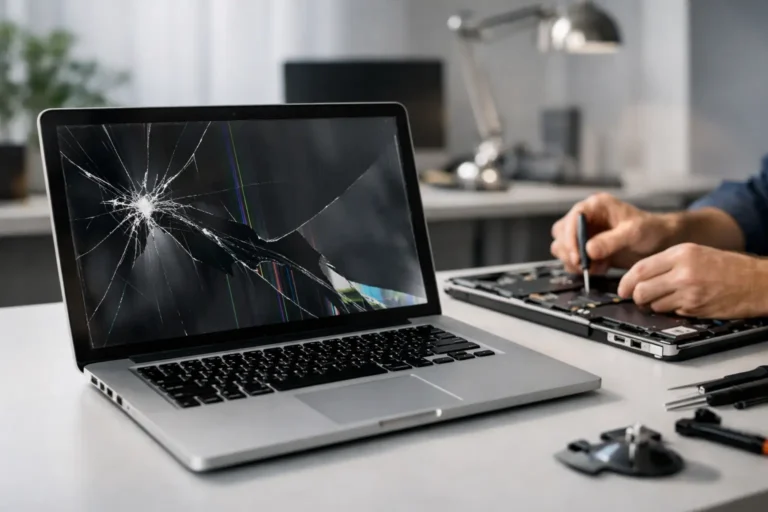
A laptop can survive a surprising amount of daily use, until one drop, closed pen, or heavy bag turns a clear display into a web of cracks. If you are asking, can a cracked laptop screen be fixed, the short answer is usually yes. In most cases, the practical fix is replacing the damaged display panel rather than attempting to repair the cracked glass itself.
The right decision depends on more than the crack. The laptop’s age, model, display type, overall condition, and the cost of a compatible replacement all matter. A qualified technician can help you decide whether a screen replacement is a sensible repair or whether your money is better put toward a newer device.
What a Cracked Laptop Screen Actually Means
Laptop screens are thin, layered components. Depending on the model, they may include an LCD or LED panel, a backlight, a digitizer for touch input, a protective glass layer, and display cables. When the visible panel is cracked, the internal layers are often damaged too.
That is why a cracked display is not like a scratched phone screen protector. Even a small crack can spread, create black blotches, cause colored lines, flickering, dead pixels, or leave part of the screen completely dark. Pressing on the damaged area can make the problem worse.
A screen may still show an image after an impact, but that does not mean it is stable. If the display is leaking dark spots, flashing, or showing broken lines, replacement should be scheduled sooner rather than later.
Can a Cracked Laptop Screen Be Fixed Without Replacing It?
For most laptops, no. The broken panel is replaced as a complete component. Attempts to glue, tape, or otherwise patch a cracked LCD rarely restore a usable image and can put additional pressure on fragile internal layers.
There are a few exceptions. If only a removable outer screen protector is cracked, replacing that protector may solve the issue. Some premium devices have separate cover glass and display assemblies, but separating them safely is specialized work and is not always cost-effective. On many modern laptops, especially thin models and touch-screen systems, the display parts are bonded together and the full assembly is the reliable repair.
A professional diagnosis matters because physical damage can extend beyond the panel. A hard impact may also damage the hinges, bezel, display cable, lid, or the laptop’s frame. Replacing only the screen without addressing a bent hinge or damaged lid can lead to another failure later.
Signs the Display Needs Replacement
A visible crack is the clearest sign, but screen damage is not always obvious. A laptop may need a new display when it has black ink-like patches, vertical or horizontal lines, flickering, a dim image, areas that no longer respond to touch, or a screen that remains black while the computer otherwise starts normally.
An external monitor can help separate a screen problem from a larger computer issue. If the laptop works normally on an external display, the internal panel, cable, or related screen hardware is the likely source of the trouble. If it does not display properly on an external monitor either, the issue could involve the graphics hardware, motherboard, operating system, or software.
That distinction is especially useful for remote workers and businesses. A cracked screen is inconvenient, but a broader hardware failure needs a different repair plan. Accurate diagnosis prevents paying for a screen replacement that will not solve the real problem.
What Affects the Cost of Laptop Screen Repair?
There is no single price for a laptop screen replacement. Standard non-touch displays for common models are generally less expensive than high-resolution, touch-enabled, OLED, gaming, or Apple laptop displays. Size is only one factor. Resolution, refresh rate, connector type, color capability, and whether the panel is integrated into the lid assembly can all affect the part and labor required.
The availability of the correct part also matters. Popular business laptops may have readily available replacement screens, while older models, specialty gaming laptops, and some ultrathin systems can require more time to source. A technician should confirm the exact model number and display specification before ordering a part. Two laptops with the same screen size can use very different panels.
It is also worth considering the device as a whole. Replacing a screen on a reliable laptop that is only a few years old is often a good investment. If the computer also has a failing battery, worn hinges, limited storage, and an aging operating system, replacement may offer better long-term value. Honest advice should account for the full picture, not just the broken screen.
Protect Your Data Before a Screen Repair
A damaged screen does not automatically mean lost files. In many cases, the laptop’s storage drive is unaffected, and your documents, photos, and business files remain intact. Still, a backup before repair is a smart precaution whenever possible.
If the laptop can connect to an external monitor, copy important files to a secure backup location or external drive. If you use cloud storage, confirm that recent work has finished syncing. For a business computer, make sure files saved locally on the desktop or in application-specific folders are included. Do not assume every file is already in the cloud.
If the display is unusable and you cannot access the system, a technician may be able to retrieve data, connect an external screen, or remove and access the drive when appropriate. Avoid repeatedly forcing the laptop open, closing a damaged lid tightly, or trying to disassemble the screen yourself. Those steps can turn a straightforward display repair into a hinge, cable, or data recovery problem.
When Repair Is the Better Choice
Screen replacement is often the best option when the laptop is otherwise fast, dependable, and suitable for your needs. This is common for a work laptop with a recent processor, a quality business-class device, or a gaming system whose performance still meets your expectations. Repair also makes sense when the device contains specialized software, configurations, or files that would take time to move to a replacement computer.
For Phoenix and East Valley households, a repaired laptop can be a practical way to avoid an unexpected purchase. For local businesses, restoring a staff workstation quickly can cost far less than the downtime caused by setting up, securing, and configuring a new machine from scratch.
A repair is less attractive when the computer is near the end of its useful life or has several expensive problems at once. A good repair provider will explain the trade-off clearly, including the expected cost, part availability, and whether a replacement device may be the more dependable path.
Why Professional Screen Replacement Is Worth Considering
Laptop screen replacement looks simple in online videos, but modern laptops are tightly built. Opening the bezel incorrectly can crack the new panel. Using the wrong screen can cause poor brightness, loss of touch capability, incompatible connectors, or image problems. Internal batteries, delicate display cables, adhesive, and fragile hinge assemblies add to the risk.
Professional service provides more than installation. It starts with identifying the exact issue, confirming the right replacement part, checking the hinges and lid for related damage, and testing the display after installation. The technician should verify brightness, resolution, webcam function when applicable, touch response, sleep behavior, and external display output.
At Freelance Computers, the goal is straightforward: give customers a clear repair recommendation and a dependable result. Whether you use a Windows laptop, MacBook, or a business workstation, experienced technicians can assess the damage, explain the options in plain language, and help protect what matters on the device.
What to Do Right After the Screen Cracks
Turn the laptop off if the screen is severely shattered, flickering, or showing spreading dark areas. Do not press on the damaged display or place tape directly over the panel. If glass fragments are loose, keep the laptop closed only as gently as possible and avoid carrying it in a bag where pressure could damage it further.
If you need immediate access, use an external monitor, keyboard, and mouse if the laptop supports them. This can keep you productive while you arrange a repair and gives you an opportunity to back up critical files. For a business device, notify your IT support team before connecting it to a personal monitor or moving sensitive data.
A cracked screen does not have to end the useful life of a laptop. The most helpful next step is a proper evaluation of the display, hinges, data, and overall condition of the computer. With the right part and careful installation, many damaged laptops return to dependable daily use without the cost and disruption of replacing the entire device.
